Home → Shipping Insurance → Shipping Insurance → Shipping Insurance: Add Insurance
1.4. Shipping Insurance: Add Insurance
How to Add Insurance to your Item:
In order to add insurance, your buyer must have checked out and your item marked as shipped either via eBay or SSB's Mark as Shipped action. If you try to add insurance to an item that doesn't meet these criteria, you will receive an error. You must add insurance within 48 hours of having shipped your item.
We depend on transaction data sent to us by eBay. Please note there is generally a 2-minute delay in updating the eBay Items views as we collect fresh transaction information from eBay.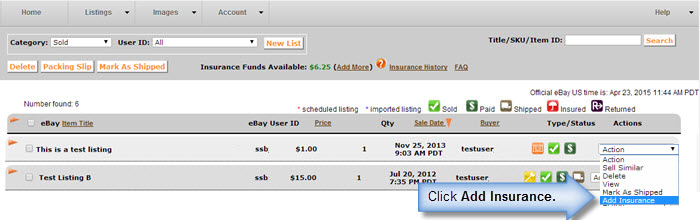
Our system automatically fills in the needed information to insure your package based on information sent to us by eBay about your transaction.
The item number is displayed, followed by the Carrier and Service Name. The carrier and service name must match the actual one used to ship your package, otherwise, your insurance purchase will be disqualified. The tracking number is imported from eBay.
The declared value is the total including shipping and handling. You may change this to the actual value of your item.
The Package Description should always include the eBay Item Title. This is automatically inserted. You may add to this description if needed.
The Seller and Buyer information is shown. This may not be changed and must reflect what is on record at eBay.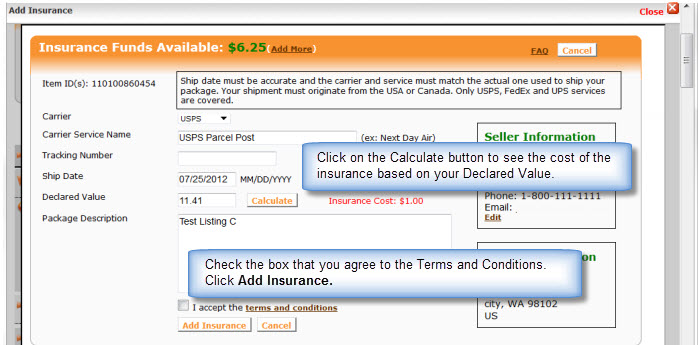
You will reach an Insurance Confirmation page that displays a confirmation number. This number is your unique insurance ID for this package and is reflected in your insurance history.
Click Continue and you will be returned to the eBay Items pages.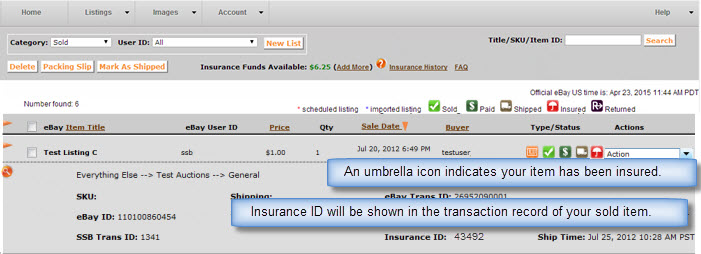
Note: Our system will prevent you from adding insurance if your carrier already includes insurance for certain values.
Only items that you launched from SSB will appear in Active and Sold views. If you list an item from SSB and it ends, and then it is relisted or sold similar from eBay (new item number generated) and that new item sells, it will not appear in the Sold view at SSB.
Shipping insurance does not support combined shipments or split listings at this time. Should you wish to insure one package containing multiple listings' items, or to insure multiple packages for a single listing's items, please contact our help desk for assistance.
Before you decide to insure your item through SSB, please check to be sure your sale has been recorded in Sold view first!
Currently, it's not possible for our members to directly cancel (void) an insurance transaction. Should you purchase insurance and change your mind, please contact our support desk for assistance. An insurance purchased may be canceled only within 24 hours and only if the package hasn't shipped.